

Cheap RFID Reader for Small Business: What Are the Options?
A few years ago, RFID felt like enterprise territory: pallets in distribution centers, hospital supply rooms, six-figure software contracts. That has changed. Tags now cost pennies, and the reading hardware has come down with them. The catch is that “cheap” means different things depending on where the reader will sit and what it has to do all day. This guide breaks down the realistic options for a small business budget, what each one handles well, and where buyers usually get burned.
Why Small Businesses Turn to RFID in the First PlaceNobody buys a reader for fun. They buy it because a manual process is failing. Counting 400 items by hand takes an afternoon and still produces errors; the same count with RFID tags and a reader takes minutes. Tool rooms lose equipment because a paper sign-out sheet lives next to the equipment. Libraries queue at the desk because every book is scanned one barcode at a time.
The pattern across all of these: the pain is repetitive, close-range, and item-based. That is exactly the profile RFID solves cheapest, and it is why a modest reader purchase often pays for itself within a season.
What “Cheap” Should Actually MeanHere is the honest version: the sticker price is the smallest number in the calculation. A genuinely cheap RFID reader for small business use is one with a low total cost of ownership — hardware price, plus software integration effort, plus support quality, multiplied by how long it lasts.
Three things decide whether a cheap reader stays cheap:
Plug-and-play behavior. If it enumerates as a USB HID keyboard or has a working SDK, integration cost is near zero. If it needs a custom driver and a week of debugging, the “cheap” hardware just became expensive.Frequency match. Most inventory and asset tags are UHF (ISO 18000-6C). Buying an HF reader when your tags are UHF is the classic beginner mistake — nothing reads, and you pay twice.Read stability at short range. Desktop units live on counters. If the read zone drifts, staff will rescan items all day, and the time savings evaporate.If you want a deeper pre-purchase checklist, our earlier post on what to check before buying a cheap USB RFID reader ↗ covers firmware, output power, and sample testing in detail.
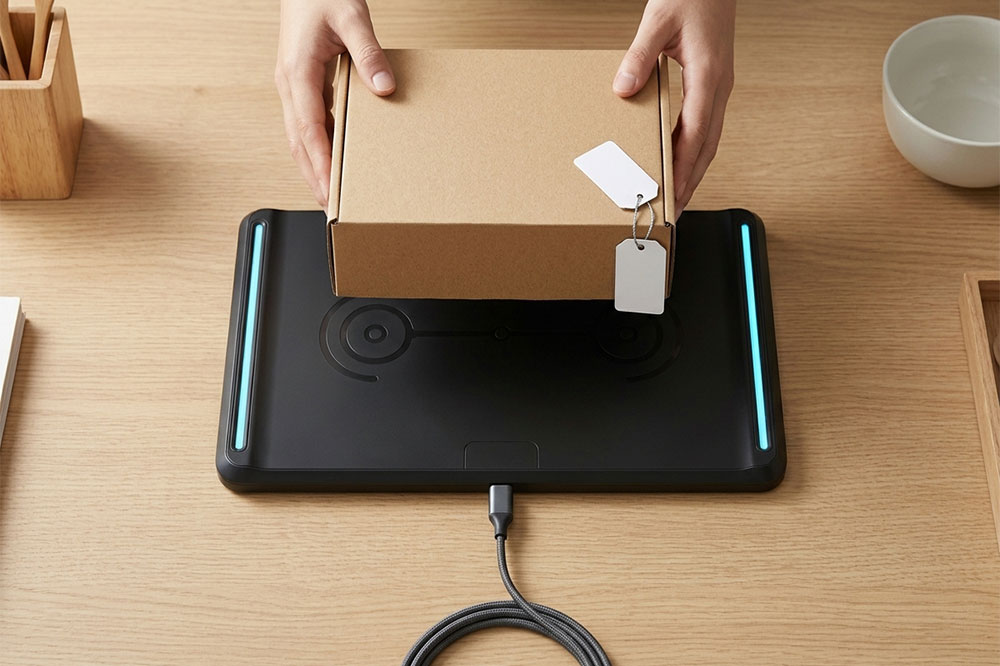
The Three Options, ComparedOption 1: USB Desktop Readers — the default choiceThis is where most small businesses should start, and it is the category behind the Cykeo USB RFID reader collection ↗. A desktop reader is a palm-sized unit that plugs into a PC or Android terminal over USB, draws power from the same cable, and reads or writes tags placed on or near it.
Best for: checkout counters, library desks, tag encoding stations, office asset registration, repair-shop intake.
Why it wins on cost:
No separate power supply, no mounting, no cabling project — it works straight out of the box.No driver installation on Windows, Linux, or Android in most Cykeo desktop models.Short-range output (typically adjustable, up to around 26–33 dBm on desktop writers) keeps reads deliberate instead of accidentally grabbing tags across the room.SDKs, APIs and demo programs ship with the hardware, so a small dev team — or even one freelancer — can wire it into existing software in days.A typical workflow: staff tap tagged items on the reader, your existing software logs each EPC code, and the inventory record updates itself. For a concrete setup walkthrough, see our guide to the best affordable USB RFID reader for PC-based applications ↗.
One thing to know: desktop readers read what is presented to them. They do not scan a whole shelf across the room. If your process needs floor-wide bulk scanning, that is the next option.
Option 2: Handheld Readers — when items are scatteredHandhelds look like thick smartphones with a scan trigger. You walk the floor and sweep shelves, racks, or equipment cases; the device reads dozens of tags per second as you pass.
Best for: stocktaking across a store or small warehouse, equipment audits, finding a specific tagged asset among many.
Trade-offs: handhelds cost more than desktop units and add battery management to your day. They earn that premium only when items physically cannot come to a desk. If 80% of your tagging happens at one counter, a handheld is a nice-to-have, not a need-to-have. Browse what that tier looks like in the handheld RFID reader category ↗.
Option 3: Fixed Readers — for automated choke pointsFixed readers mount permanently at a doorway, a stockroom entrance, or a return chute. When tagged items pass through, the system registers them with no human action at all.
Best for: theft deterrence at shop exits, automatic check-in of returned items, tunnel-style batch intake.
Trade-offs: this is the most expensive option once you include installation and tuning, and for many small businesses it solves a problem they do not yet have. Start with a desktop reader, prove the workflow, and add a fixed installation only if volume justifies it. See the RFID gate reader category ↗ to understand the hardware involved.
How to Match a Reader to Your Actual WorkflowRun this quick decision sequence before spending anything:
Where do tagged items sit when they need reading? On a desk or counter → desktop. Scattered across a floor → handheld. Moving through a doorway in bulk → fixed.Do you need to write tags, or only read them? Encoding your own tags (printing and writing EPCs before items go on shelves) requires a reader-writer. Most desktop models handle both; verify read and write specs before ordering.Who will connect it to software? If you have no developer, pick hardware that ships with demo software and reads as a keyboard device — you can be logging tags in a spreadsheet within an hour. If you have a dev team, prioritize a documented SDK; our post on choosing a reliable cheap RFID reader manufacturer ↗ explains which documentation and support signals to demand.What is your tag standard? If you are starting fresh, standardize on UHF ISO 18000-6C tags — the widest hardware and tag ecosystem, which is what keeps your future costs down.A Realistic Budget PictureRather than quoting prices that shift, here is how the tiers relate: a desktop USB reader is typically the cheapest complete setup — hardware plus free demo software gets you operational. A handheld generally costs several times a desktop unit. A fixed gate installation costs more again once mounting and tuning are counted, and tags themselves (usually a few cents each at volume) are a rounding error by comparison.
For most businesses under 2,000 tracked items, the answer is one desktop reader and a spreadsheet-or-lightweight-software workflow. That entire investment is smaller than a single afternoon of wasted manual counting per month.
Three Buying Mistakes That Turn Cheap into ExpensiveBuying on range specs. A 15-meter range figure is irrelevant at a checkout desk — and long-range output on a desktop unit can cause accidental reads of neighboring tags. Match range to the task.Ignoring the SDK. If the seller cannot show you a working demo program and documentation before purchase, walk away. The hardware may be fine, but your integration cost is now a gamble.Skipping a sample test. Order one unit, test it with your real tags and real software before rolling out. Reputable suppliers expect this; our article on what to check before buying a cheap USB RFID reader ↗ includes a test script you can follow.Where to Start: A Concrete PickIf your situation is “a counter, a PC, and a desire to stop counting things by hand,” the straightforward pick is a compact UHF desktop unit such as the CYKEO-D1L RFID scanner USB ↗. It reads and writes ISO 18000-6C tags, runs on USB power alone across Windows, Linux, and Android, supports batch encoding for preparing tag rolls in advance, and keeps output in a controlled short range so counter-side reads stay deliberate. For slightly heavier encoding duty — higher throughput or OEM customization — the SSD-D3AL USB RFID reader ↗ is the step-up model with 600+ tags/second recognition and logo customization for resellers.
Both sit inside the wider USB RFID reader collection ↗, which is worth browsing simply to see how narrow the real differences between desktop models are: interface, output power, chip grade. Once you see the spread, choosing gets easier — and cheaper — than most buyers expect.
Frequently Asked QuestionsHow much does a cheap RFID reader for small business use actually cost?A plug-and-play USB desktop reader is the cheapest complete entry point, and the total launch cost — hardware plus free demo software plus a pack of tags — usually lands below the cost of a few lost tools or one bad stock count. Handhelds and fixed readers sit in higher tiers. Contact Cykeo’s sales team for current B2B pricing, which varies with order volume and customization.
Do I need special software to use a USB RFID reader?Not to start. Most desktop readers appear to the computer as a keyboard device, so every tag read appears as text wherever your cursor is — a spreadsheet is enough for day one. For real workflows, SDKs and APIs let you connect the reader to inventory or asset software; Cykeo supplies demo programs and integration support with its desktop readers.
What frequency should a small business RFID reader use?UHF (860–960 MHz, ISO 18000-6C) is the standard for retail inventory, asset tracking, and tool management — it has the largest tag ecosystem and matches the Cykeo desktop and handheld ranges. HF/NFC only makes sense for payment-style cards or phone interaction.
Can one cheap reader handle both reading and writing tags?Yes, if you choose a desktop reader-writer. Models like the CYKEO-D1L encode EPC data onto blank tags and read existing ones, which matters if you print and prepare your own tag rolls before items reach the shelf.
Will RFID tags work through plastic and cardboard?UHF tags read fine through most non-metallic materials, which is why boxed goods and hanging garments scan without unpacking. Metal and liquid interfere with standard tags — those cases need specialized on-metal tags or adjusted placement, so test your real products during a sample run.
Ready to try one on your own counter? Request a sample or quote for the CYKEO-D1L USB RFID reader ↗ and test it against your real tags before committing to a rollout.