Articles

Articles & Insights

Discover, learn, and grow with stories from our ecosystem members.

search
filter_list Category: tech-innovation
close
RFID Tool Cabinet for Tool Asset Management: Better Visibility and Control of Industrial Tools Tech & Innovation
Oct 13, 2026 β€’ visibility 1 β€’ 21 min read

RFID Tool Cabinet for Tool Asset Management: Better Visibility and Control of Industrial Tools

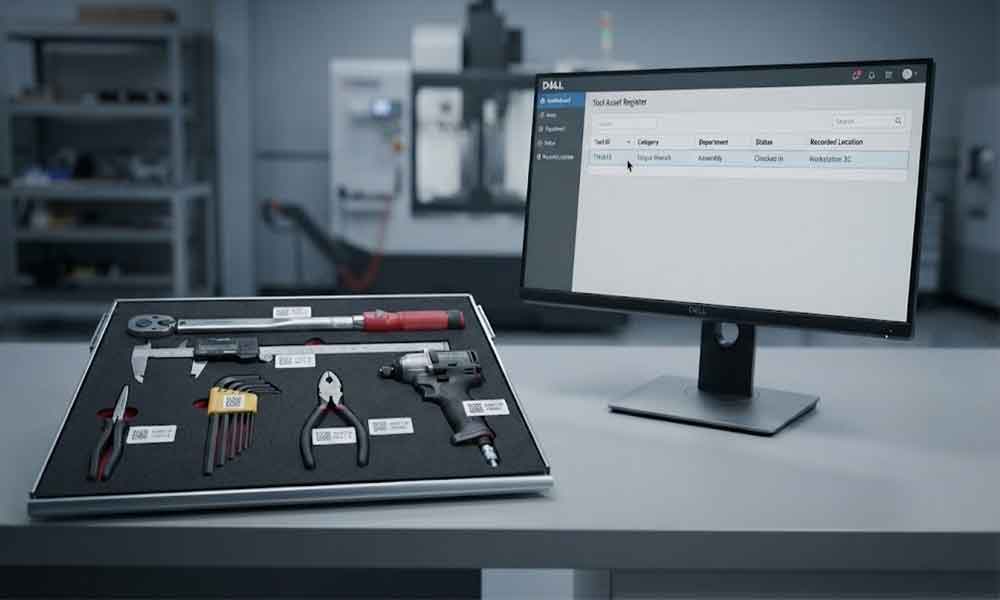
Industrial tools are assets, even when they are too small to appear on a company’s main equipment register. Torque wrenches, measuring instruments, maintenance tools, power tools, and specialized production equipment can all carry a purchase cost and an operational responsibility. When these items move between departments, technicians, workshops, and storage locations, maintaining reliable records becomes difficult.An RFID tool cabinet can help connect physical tools with digital asset records. Instead of relying entirely on spreadsheets or manual sign-out sheets, a company can use RFID identification, cabinet transactions, and management software to improve visibility into tool identity, location, availability, and responsibility.The objective is not simply to count tools. It is to make tool assets easier to identify, manage, audit, and allocate throughout daily operations.What Is RFID Tool Asset Management?RFID tool asset management is the process of identifying, recording, locating, and controlling tools with the help of radio frequency identification technology and connected management software.Each managed tool is associated with a digital record. Depending on the application, this record may contain a tool ID, description, category, department, assigned location, purchase information, responsible user, condition, and maintenance references.An RFID tag provides a way to identify the physical tool. An RFID reader or cabinet reading system detects compatible tags, while software associates the captured identification data with the corresponding asset records.An RFID smart tool cabinet adds a practical control point to this process. It can support tool storage, user authentication, checkout and return recording, and inventory checks. The exact functions depend on the cabinet hardware, software configuration, and integration requirements.For factories managing hundreds or thousands of tools, this connection between physical storage and digital records can make routine asset management more consistent.Why Industrial Tool Assets Are Difficult to ManageMany factories already have an asset register. The problem is that the register does not always reflect what happens on the workshop floor.A spreadsheet may show that a tool belongs to the maintenance department, but the tool could be in a technician’s toolbox, on a production line, awaiting inspection, or temporarily stored in another workshop.These gaps create several practical problems.Asset records become outdatedTools may be transferred between departments without updating their assigned locations. Staff may also replace a damaged tool, change its storage position, or lend it to another team without updating the relevant records.Over time, the asset register and physical inventory can become inconsistent.Responsibility is difficult to establishWhen several technicians share the same equipment, it may be unclear who last checked out a tool or who should return it. This is especially challenging for expensive, specialized, or frequently shared tools.Manual audits consume timeA conventional asset audit may require employees to visit storage locations, read labels, compare serial numbers, and update spreadsheets. If tools are distributed across multiple locations, the work becomes more complicated.Asset availability is not always clearA tool may exist in the asset register but still be unavailable for work. It could be checked out, misplaced, damaged, reserved, or awaiting inspection.For maintenance and production teams, knowing that a tool exists is not enough. They also need to understand its current operational status.How RFID Tool Cabinet Supports Asset ManagementConnect each tool with digital asset recordThe first step is to establish a reliable identity for every managed tool.A tool can receive a unique asset ID and a suitable RFID tag. The corresponding software record stores the tool’s basic information and links the physical item to its digital identity.The record might include the tool category, model, serial number, department, storage location, and asset status. Additional fields can be included when needed.RFID tags do not necessarily need to store all this information themselves. In many deployments, the tag provides an identifier, while the main record remains in the management system.This arrangement makes it easier to update asset information without rewriting the entire record on the physical tag.Improve visibility into tool locationsAn RFID tool cabinet provides a defined location where tools can be stored and identified.When a tool is checked out or returned through a supported workflow, the system can record the transaction and update the associated location or custody information. Where several cabinets are connected to a shared platform, authorized users may be able to view tool records across departments or facilities.However, a cabinet transaction does not automatically prove the exact real-time location of a tool after it leaves the cabinet. If a technician carries the tool to another work area, the system needs an additional recording method or tracking infrastructure to establish its subsequent location.Clear rules for transfers, returns, and temporary storage help keep location records useful.Record tool custody and responsibilityAsset management often requires more than knowing where a tool is stored. Managers also need to know who has taken responsibility for it.A connected cabinet can support user authentication and tool checkout records. Depending on the configuration, a transaction may link a tool, user, timestamp, and cabinet location.These records help supervisors investigate missing tools, review borrowing history, and identify repeated problems in a shared tool room.For high-value assets, permission rules can also restrict access to selected tools or categories. The system should match these rules to actual job responsibilities rather than making access unnecessarily complicated.Make asset inventory easier to maintainRFID identification can reduce the amount of manual work required for routine tool checks.A compatible cabinet may identify multiple tagged tools during an inventory process, depending on the tag design, tool materials, cabinet structure, antenna arrangement, and reading configuration.The resulting records can be compared with the expected inventory to identify discrepancies. Staff can then investigate missing, unexpected, or incorrectly registered tools.RFID does not guarantee perfect reading in every environment. Metal surfaces, closely packed tools, tag orientation, and overlapping read zones can affect performance. Representative tools should be tested before a system is deployed at scale.Connect asset status with daily operationsA tool’s asset record becomes more useful when it reflects operational conditions.For example, a tool may be registered and present in a cabinet but unavailable because it is damaged or overdue for inspection. Another tool may be available but assigned to a different department.A well-designed system can distinguish between statuses such as available, checked out, under maintenance, awaiting inspection, and retired. The exact status model should reflect the company’s operating procedures.Where calibration or maintenance records are important, the asset management system can link to the relevant maintenance or quality software instead of keeping disconnected copies of the same information.What Information Should Tool Asset Record Contain?The required data depends on tool value, risk, usage, and company procedures. A practical starting point is to define a consistent record structure.Asset informationManagement purposeUnique asset IDDistinguishes one tool from anotherRFID tag IDConnects the physical tag with the digital recordTool name and categoryMakes search and reporting easierModel or serial numberSupports identification and verificationAssigned departmentShows organizational responsibilityCurrent recorded locationHelps users find the toolAsset statusShows availability or restrictionsCurrent custodianSupports accountability for checked-out toolsTransaction historyRecords issue, return, and transfer eventsMaintenance or inspection referenceConnects the tool with relevant service recordsPurchase or asset valueSupports financial and replacement reviews where requiredNot every tool needs every field. Adding too many mandatory fields can make registration slow and increase the chance of incomplete records.A better approach is to define the minimum information needed for all tools, then add specialized fields for high-value equipment, calibrated instruments, or tools subject to stricter controls.RFID Tool Cabinets and Enterprise Asset Management SoftwareAn RFID cabinet can manage a defined tool storage and transaction workflow, but larger organizations may already use ERP, CMMS, MES, warehouse software, or an enterprise asset management platform.Integration can connect cabinet activity with these existing records.For example, ERP software may hold purchasing and financial information. A CMMS may manage maintenance activities and work orders. MES software may coordinate production operations. The RFID tool management layer can supply tool identification and transaction events where the interface supports them.Before integration, the project team should define which system owns each data field. If two systems can independently update a tool’s department or status, conflicting records may appear.The technical design should also specify how events are transmitted, how failed synchronization is handled, and how duplicate transactions are prevented. APIs, scheduled data exchange, or other supported interfaces may be appropriate depending on the existing software.A small pilot involving representative tools and actual users is often a practical way to validate these decisions before connecting multiple cabinets.How to Implement RFID Tool Asset ManagementStart with an asset auditReview the existing tool register and compare it with the tools physically available. Identify duplicate records, missing asset IDs, outdated locations, and inconsistent tool names.There is little value in automating a database that already contains major identification problems.Classify tools by management requirementsNot every item needs the same level of control. Frequently shared tools, high-value equipment, precision instruments, and general-purpose hand tools may require different tag types, permissions, and record fields.Classification helps control implementation costs and keeps the workflow appropriate for each tool category.Test tags and cabinet reading performanceSelect representative tools, including metal tools and items with unusual shapes or dense storage arrangements. Test whether the proposed tags can be read reliably in the intended cabinet.Confirm how the system handles multiple tools, unexpected reads, and tools placed close together. Actual test results are more useful than relying on a reader’s maximum advertised range.Define location, custody, and status rulesDecide what happens when a tool is issued, returned, transferred, sent for repair, or retired.For example, a checkout transaction might update custody without changing the tool’s home department. A transfer transaction might change the assigned location. Keeping these meanings separate helps avoid misleading records.Validate reports and integrationBefore full deployment, compare cabinet records with physical checks. Confirm that users can locate tools, supervisors can review transaction histories, and exceptions can be investigated.If the project includes ERP, CMMS, or MES integration, test synchronization failures and record updates as well as the normal workflow.Common Mistakes in Tool Asset Management ProjectsOne common mistake is treating the RFID tag as the complete asset management solution. Identification is important, but useful records also depend on accurate master data, sensible workflows, and consistent user behavior.Another problem is assuming that a tool’s last cabinet transaction provides continuous location tracking. Tools taken to a work area may need separate transfer or return procedures to keep location information current.Companies may also create too many asset statuses or require unnecessary data entry. The resulting process becomes difficult to follow, and employees may work around it.Finally, deploying multiple cabinets before validating the asset data and user workflow can multiply small errors across the organization. A pilot helps reveal these problems while the scope is still manageable.Choosing RFID Tool Cabinet for Asset ManagementWhen evaluating an RFID tool cabinet, review the complete solution rather than the cabinet enclosure alone.Consider whether the cabinet supports the required tool types, RFID tags, authentication methods, inventory workflows, and transaction records. Check how it manages multiple tools, whether it can support several cabinets, and which software interfaces are available.Ask the supplier to demonstrate the actual tools and tags you plan to manage. Clarify what is included in the software, installation, data migration, integration, training, and ongoing support.For an enterprise project, also confirm who owns the asset records, how data can be exported, and what happens if the network or external software becomes unavailable.A suitable solution should improve the company’s existing asset management process rather than simply introduce another disconnected database.ConclusionRFID tool cabinets can help companies connect physical tools with digital asset records, improve visibility into recorded locations and custody, and simplify routine inventory checks. Their value depends on more than RFID hardware: accurate asset data, reliable reading performance, clear operating rules, and suitable software integration are equally important.For industrial teams, the practical goal is to maintain a trustworthy picture of each managed tool: what it is, where it was last recorded, who is responsible for it, and whether it is available for work. Starting with a well-defined pilot gives the organization a realistic basis for improving tool asset management across more departments and locations.For companies planning a wider tool management project, the RFID tool cabinet category provides a starting point for evaluating cabinet options. Teams can also review RFID tool cabinet data management, RFID tool cabinet software integration, and the RFID tool cabinet pilot project guide before selecting a deployment approach.

AI Mobile App Proof of Concept vs. MVP: What Should Your Business Build First? Tech & Innovation
Oct 13, 2026 β€’ visibility 1 β€’ 18 min read

AI Mobile App Proof of Concept vs. MVP: What Should Your Business Build First?

Artificial intelligence is changing how businesses design mobile applications, from AI-powered customer support and personalized recommendations to document processing, voice assistants, and task automation. However, building an AI feature that works in a demonstration is very different from delivering a mobile app that customers can trust and use every day.That distinction makes the choice between a proof of concept (PoC) and a minimum viable product (MVP) especially important in AI-powered mobile app development. A PoC helps determine whether a proposed AI capability is technically feasible. An MVP tests whether that capability solves a genuine business problem when used by real customers.For example, a retail company exploring an AI shopping assistant might first need to verify whether a language model can generate accurate product recommendations from its catalog. Once that works, the company can build an MVP that lets selected customers discover products, ask questions, and provide feedback.The right starting point depends on what remains uncertain, how much risk the business can tolerate, and what evidence decision-makers need before investing further.What Is an AI Mobile App Proof of Concept?An AI mobile app proof of concept is a limited technical experiment designed to validate a specific assumption before a business commits to full-scale development.In AI-powered mobile app development, the uncertainty may involve model accuracy, device compatibility, response latency, data quality, API integration, or the feasibility of running AI features directly on a smartphone.Consider a healthcare organization planning an AI assistant that summarizes patient documents. Before building the complete application, its development team could test whether the chosen model extracts relevant information accurately, processes permitted document formats, and protects sensitive data within the intended architecture.The PoC does not need a polished interface, complete onboarding, or a full set of application features. It needs measurable evidence that the underlying approach can work.What Should an AI Mobile App PoC Validate?A useful PoC focuses on the highest-risk technical assumptions rather than attempting to demonstrate the entire product.Model feasibility: Can the selected model complete the intended task with acceptable accuracy?Data readiness: Is the available data sufficiently relevant, clean, and structured to support useful outputs?Mobile performance: Can the feature respond within acceptable latency and memory limits on representative devices?Integration feasibility: Can the AI capability connect reliably with existing APIs, databases, authentication systems, and enterprise software?Privacy and security: Can sensitive information be processed, stored, and transmitted according to business requirements?Inference cost: Are model calls, token usage, infrastructure, and expected usage volumes economically sustainable?These tests are particularly important when an application uses retrieval-augmented generation (RAG), on-device inference, multimodal AI, or agentic workflows that execute multiple steps.A chatbot that answers five prepared questions successfully is not sufficient evidence that an enterprise assistant can handle thousands of varied customer requests. The PoC should test representative inputs, difficult cases, failure scenarios, and clearly defined acceptance criteria.What Is an AI Mobile App MVP?An AI mobile app MVP is the smallest usable version of an application that delivers meaningful value to real users and helps a business evaluate adoption.Unlike a PoC, an MVP connects the validated AI capability to a practical mobile experience. It includes the essential interface, core workflow, required integrations, analytics, and baseline safeguards needed for its intended users.For example, after validating an AI-powered expense categorization model, a fintech company could release an MVP that allows a limited group of users to upload receipts, review suggested categories, correct mistakes, and track expenses.The first release would not need advanced financial forecasting, multiple integrations, or automated tax reporting. Its purpose would be to establish whether users find the core workflow useful and whether the AI performs reliably enough in everyday situations.What Should an AI Mobile App MVP Include?The scope depends on the use case, but most customer-facing AI mobile MVPs require:One clearly defined use case: Solve a specific problem for a defined audience rather than introducing multiple unrelated AI features.A complete core workflow: Enable users to move from input to AI-generated output and take the intended next action.Appropriate AI safeguards: Handle uncertain responses, unsupported requests, and errors without presenting unreliable outputs as facts.Essential security controls: Implement suitable authentication, authorization, data protection, and privacy measures.Usage analytics: Track activation, feature adoption, task completion, repeat usage, and AI-specific failures.Feedback mechanisms: Allow users to report inaccurate results, correct outputs, or request human assistance where appropriate.An MVP is not a disposable demo. Even with limited functionality, it must be dependable enough for its intended users and deployment environment.In AI-powered mobile app development, the team must also consider model costs, monitoring, fallback behavior, and how the application will respond when network connectivity or an external AI service becomes unavailable.AI Mobile App PoC vs. MVP: Key DifferencesAlthough both approaches reduce development risk, they produce different types of evidence. Choosing between them should depend on the business question that needs answering.FactorAI Mobile App PoCAI Mobile App MVPPrimary objectiveValidate technical feasibilityValidate user value and demandMain questionCan the AI feature work?Will users benefit from it?ScopeOne or a few high-risk capabilitiesOne complete, useful user workflowTarget audienceInternal technical and business teamsSelected real-world usersAI evaluationAccuracy, latency, integrations, costReliability, adoption, task completion, cost per outcomeInterfaceMinimal or experimentalUsable and designed for the core journeyDeliverableTechnical findings and a go/no-go decisionWorking mobile application and usage evidenceNext stepRefine the approach or proceedImprove, expand, reposition, or stopA successful PoC does not establish product-market fit. Likewise, positive feedback on an MVP does not automatically prove that the application can scale economically.The distinction is important because AI features can behave differently when exposed to varied user inputs, real-world data, and sustained usage.What Is Trending in AI Mobile App Development in 2026?Businesses evaluating AI-powered mobile app development increasingly need to assess more than whether a model produces an impressive output. The practical challenge is making AI reliable, affordable, secure, and useful within a mobile product.1. On-Device AI vs. Cloud-Based AIOn-device AI can support privacy-sensitive features, offline functionality, and lower network dependence. Cloud-based models may offer greater computational capacity and access to more complex reasoning capabilities, depending on the model and implementation.A PoC should compare representative devices, memory consumption, response times, model capabilities, and battery impact. An MVP can then test whether users benefit from on-device processing, cloud inference, or a hybrid architecture that routes tasks according to complexity and privacy requirements.2. Agentic AI and Multi-Step WorkflowsAI mobile applications are moving beyond answering questions toward assisting with tasks, such as preparing reports, organizing information, and coordinating business workflows.These capabilities introduce new risks. An agent might misunderstand a request, invoke the wrong tool, or repeat expensive operations. A PoC should test tool-calling accuracy, permission boundaries, error recovery, and execution limits before the feature is released to users.The MVP should begin with a constrained workflow, explicit user approval for consequential actions, and clear visibility into what the AI has done.3. RAG and Business-Specific KnowledgeGeneric language models may not have access to a company's latest product information, internal documents, or approved policies. Retrieval-augmented generation allows an application to retrieve relevant information from an authorized knowledge source before generating an answer.A PoC should measure retrieval relevance, answer accuracy, citation quality, and behavior when the necessary information is unavailable. An MVP should add practical features such as source references, access controls, feedback collection, and monitoring for unsupported answers.4. AI Cost and Reliability Under Real UsageA feature that performs well during a short demonstration may become expensive when users repeatedly upload documents, request long responses, or trigger multiple model calls.Test realistic usage patterns, including peak demand, failed requests, retry behavior, and cost per completed task. For an MVP, monitor cost alongside retention and task completion rather than optimizing solely for response speed or the number of AI interactions.How Should Businesses Decide What to Build First?The most effective approach is to identify the uncertainty that could invalidate the next investment.Build a PoC first when:The application depends on an untested AI model or unfamiliar integration.On-device performance or hardware compatibility is uncertain.The feature requires complex RAG, multimodal processing, or agentic execution.Data quality, model accuracy, or inference costs could make the concept impractical.Build an MVP first when:The core AI technology has already been validated in a comparable environment.The main uncertainty is customer demand or workflow adoption.Target users need to evaluate a functioning product rather than a technical demonstration.Existing evidence is strong enough to justify a limited, monitored release.If both technical feasibility and market demand are uncertain, start with a narrowly scoped PoC, then move toward an MVP once the critical technical risks are understood.A Practical Roadmap for AI-Powered Mobile App DevelopmentBusinesses can use the following approach to keep early development focused and measurable.Step 1: Define the business problem. Identify the target user, the task the application should improve, and the baseline against which results will be measured.Step 2: Establish acceptance criteria: Set thresholds for accuracy, response latency, cost, privacy, and failure handling. The appropriate thresholds depend on the use case and its consequences.Step 3: Build the smallest meaningful PoC: Test the riskiest assumption using representative data and realistic device or backend conditions. Document limitations instead of hiding failed cases.Step 4: Validate the mobile experience: Test a clickable prototype if navigation, user trust, or interaction design remains uncertain. This step can happen before or alongside technical experimentation.Step 5: Develop a focused MVP: Implement the core user journey, essential safeguards, analytics, and operational monitoring. Avoid adding features that do not help answer the primary business question.Step 6: Evaluate real-world evidence: Review task completion, repeat usage, user corrections, failure rates, and cost per successful outcome. Use the findings to decide whether to iterate, expand, or stop.The technology choice should support this roadmap rather than dictate it. Businesses exploring native Apple experiences can evaluate iOS App Development Solutions, while teams targeting multiple mobile platforms may consider React Native App Development Solutions, depending on device-level AI requirements and the intended user experience.Debut Infotech can be considered as a development partner for businesses assessing AI-enabled mobile applications, provided the proposed engagement is scoped around measurable technical and business outcomes.Final Verdict: PoC or MVP?There is no universal rule that every AI mobile application must follow the same development sequence. A proof of concept is the stronger starting point when an unresolved technical risk could make the product unworkable. An MVP is the better investment when the technology is sufficiently proven and the business needs evidence of customer value.For AI-powered mobile app development, the goal is not to build the most impressive demonstration or launch the largest feature set. It is to resolve the most consequential uncertainty with the smallest credible investment, then use evidence to determine what deserves to be built next.

Instamart Data Scraping for SKU, Price & Delivery Time Insights Tech & Innovation
Oct 12, 2026 β€’ visibility 1 β€’ 11 min read

Instamart Data Scraping for SKU, Price & Delivery Time Insights

IntroductionThe rapid expansion of quick-commerce platforms has transformed how consumers purchase groceries and daily essentials. Customers now expect accurate pricing, broad product availability, and ultra-fast deliveries, making data-driven decision-making more critical than ever. This is where data extraction technologies provide measurable value by converting platform information into actionable business intelligence.Retailers, FMCG brands, aggregators, and analytics companies increasingly rely on Web Scraping Swiggy Instamart Quick Commerce Data to monitor market trends and understand customer-facing operational metrics. By collecting SKU-level information, businesses can identify assortment gaps, track pricing changes, and evaluate delivery efficiencies across locations. These insights help organizations improve demand forecasting, optimize inventory planning, and refine promotional strategies.Modern analytics frameworks depend on high-quality, real-time datasets that accurately reflect marketplace conditions. With Instamart Data Scraping for SKU, Price & Delivery Time Insights, organizations can capture critical information at scale and transform raw data into structured intelligence. As competition intensifies across quick-commerce ecosystems, accurate and timely data has become a foundational requirement for successful business planning and market analysis.Building Strong Product Intelligence Across Dynamic Grocery CatalogsQuick-commerce platforms continuously update product assortments based on demand patterns, seasonal requirements, regional preferences, and supplier availability. These frequent changes create significant challenges for brands, retailers, and analytics teams attempting to maintain an accurate understanding of marketplace conditions. Without automated monitoring, businesses often struggle to track assortment shifts, identify emerging product trends, and evaluate competitive positioning across categories.A major source of visibility comes from Swiggy Instamart Product Datasets, which provide structured information about product names, brands, categories, pack sizes, prices, discounts, and availability. Research indicates that companies using automated marketplace intelligence solutions can reduce manual tracking efforts by more than 60% while improving assortment visibility by nearly 30%.SKU Tracking β€” Business Value: Better assortment analysis.Category Monitoring β€” Business Value: Improved market visibility.Product Availability Checks β€” Business Value: Stronger inventory planning.Catalog Benchmarking β€” Business Value: Enhanced competitive reviews.Listing Comparisons β€” Business Value: Faster decision-making.Reliable product intelligence allows organizations to understand how offerings evolve over time while supporting more informed category planning decisions. Organizations also utilize Instamart SKU Scraping for Competitor Analysis to evaluate competitor portfolios, compare category depth, and identify assortment opportunities.Additionally, Instamart Grocery Product Data Scraping for Insights helps transform raw marketplace information into structured analytics that support demand forecasting and customer behavior evaluation. As grocery platforms continue expanding their product ecosystems, accurate product intelligence remains essential for effective market planning and sustained business growth.Improving Pricing Visibility Through Regional Market MonitoringPricing dynamics within quick-commerce platforms change rapidly due to promotional campaigns, supply fluctuations, customer demand patterns, and local market conditions. As a result, many organizations are investing in automated data collection systems that provide real-time visibility into marketplace pricing behavior and competitive activity.A well-structured Instamart Product Dataset enables businesses to analyze pricing patterns across regions, categories, and brands with greater precision. These datasets support comparative analysis of discounts, promotions, product positioning, and price variations that directly influence purchasing behavior. Industry studies suggest that companies using automated pricing intelligence can improve pricing accuracy by up to 35% while significantly reducing response times to competitive changes.Discount Tracking β€” Strategic Benefit: Better promotion planning.Regional Price Analysis β€” Strategic Benefit: Localized pricing decisions.Competitor Monitoring β€” Strategic Benefit: Improved positioning.Margin Evaluation β€” Strategic Benefit: Revenue optimization.Dynamic Price Insights β€” Strategic Benefit: Faster market adaptation.Businesses increasingly rely on Quick Commerce Data Scraping Using Instamart Data to establish consistent pricing benchmarks and monitor fluctuations across multiple locations. These insights help organizations identify pricing anomalies, assess promotional effectiveness, and refine revenue management strategies.By combining structured pricing information with operational analytics, organizations can better understand customer purchasing trends and market responsiveness. Accurate pricing visibility remains one of the most important factors supporting profitability, competitiveness, and long-term growth within rapidly evolving grocery commerce ecosystems.Advancing Delivery Efficiency And Inventory-Based Operational PlanningFast and reliable delivery has become a major differentiator in modern grocery commerce. Businesses seeking to improve customer satisfaction therefore require continuous visibility into operational metrics that influence delivery performance and inventory efficiency. Automated intelligence systems help organizations monitor these variables while supporting more effective logistics and supply chain planning.Modern analytics frameworks supported by Enterprise Web Crawling allow businesses to collect delivery estimates, availability information, fulfillment indicators, and location-specific operational metrics at scale. Industry observations indicate that organizations using automated delivery intelligence can improve logistics planning accuracy by approximately 25% while enhancing operational decision-making.Delivery Time Monitoring β€” Business Outcome: Improved logistics planning.Service Area Evaluation β€” Business Outcome: Better market coverage.Fulfillment Tracking β€” Business Outcome: Enhanced operational visibility.Stock Availability Checks β€” Business Outcome: Reduced stock shortages.Performance Benchmarking β€” Business Outcome: Stronger service optimization.Inventory management remains equally important for maintaining customer trust and minimizing lost sales opportunities. Through Instamart Grocery Inventory Monitoring Using Web Scraping, businesses can observe inventory fluctuations, identify recurring stock shortages, and evaluate replenishment efficiency across locations.When delivery performance and inventory analytics are combined, organizations gain a more complete understanding of operational effectiveness. These insights support smarter warehouse planning, improved customer experiences, and stronger decision-making across fast-moving grocery commerce environments.How ArcTechnolabs Can Help You?Modern quick-commerce ecosystems generate enormous amounts of marketplace data that can be difficult to collect, process, and analyze efficiently. Through Instamart Data Scraping for SKU, Price & Delivery Time Insights, businesses can build robust analytics frameworks that support pricing optimization, inventory management, and delivery performance evaluation.Our capabilities include:Automated marketplace data extraction solutionsLarge-scale product catalog monitoring systemsReal-time pricing intelligence frameworksDelivery performance tracking and reportingInventory availability analytics solutionsCustom dashboards and data integration supportOur expertise in Quick Commerce Data Scraping Using Instamart Data enables organizations to maintain visibility into rapidly changing market conditions while improving analytics accuracy across multiple business functions.ConclusionData-driven decision-making has become essential for businesses operating within fast-moving grocery marketplaces. By implementing Instamart Data Scraping for SKU, Price & Delivery Time Insights, organizations can improve pricing visibility, monitor product availability, analyze delivery performance, and strengthen overall analytics accuracy.Additionally, Instamart Grocery Inventory Monitoring Using Web Scraping provides valuable operational intelligence that supports inventory optimization, forecasting accuracy, and customer satisfaction improvements. Contact ArcTechnolabs today to build scalable quick-commerce intelligence solutions that support smarter business growth and competitive market positioning.#InstamartDataScrapingForSKUPriceAndDeliveryTimeInsights,#QuickCommerceDataScrapingUsingInstamartData,#InstamartSKUScrapingForCompetitorAnalysis,#InstamartGroceryProductDataScrapingForInsights,Source: https://www.arctechnolabs.com/instamart-data-scraping-for-sku-price-delivery-time-insights.phpContact us:E-mail: [email protected] No: +91 8866656657Visit Now: https://www.arctechnolabs.com/

Steve Harringtone
Read arrow_forward
what is a rfid label: A Practical Guide to RFID Labels Tech & Innovation
Oct 12, 2026 β€’ visibility 1 β€’ 7 min read

what is a rfid label: A Practical Guide to RFID Labels

RFID label is a printable identification label that combines an RFID chip and antenna with a paper or synthetic label material. It allows products, cartons, or assets to be identified wirelessly while retaining human-readable information such as product names, numbers, or barcodes.That distinction matters in real deployments. An RFID label is not simply a barcode with radio communication added. Inside the label is an RFID inlay containing the chip and antenna; the outer material provides the surface for printing and attachment.At Cykeo, when we evaluate RFID labels for an application, we look at the item being tagged first, not just the reader specification. A label that performs well on corrugated cartons may behave very differently when moved onto a metal tool, liquid-filled container, or densely packed product.That is one of the details that tends to get missed during procurement.How RFID Labels WorkWhat Is Inside an RFID Label?A typical RFID label contains three functional layers:ComponentPrimary FunctionRFID chipStores identification and other encoded dataRFID AntennaReceives reader energy and communicates with the readerLabel substrateHolds the inlay and provides a printable surfaceFor a passive RFID label, the tag does not need a battery. The reader supplies the RF energy needed for communication.GS1 describes RFID as a family of technologies in which information is stored in a microelectronic chip and communicated with dedicated readers using radio-frequency waves or fields. GS1’s current standards repository lists EPC Gen2 as the UHF RFID air-interface standard and the current version as 3.0.1, modified February 26, 2026.That makes RFID labels particularly useful when a business needs to identify large numbers of physical objects without manually scanning every printed code.What Data Can an RFID Label Carry?The answer depends on the RFID chip and how the system is configured.In an EPC-based deployment, an RFID label can carry an Electronic Product Code associated with a unique physical object. GS1 explains that EPC provides a way to encode GS1 identifiers on RAIN RFID tags and can add serialization to identifiers such as GTINs.Typical information associated with an RFID label includes:Product identificationSerialized item informationAsset identificationInventory referencesApplication-specific user memoryInformation associated with a GS1 identifierThe label does not necessarily need to contain every piece of product information. In many systems, the RFID tag provides the identifier while the business database holds the detailed record.RFID Label Types for Different ApplicationsUHF RFID LabelsUHF RFID labels are common in logistics, warehousing, retail, and supply-chain applications because they can support identification of multiple tagged objects within a reading zone.GS1’s EPC/RFID specifications identify UHF EPC/RFID as operating in the 860–960 MHz range, while the specific regulatory operating band depends on the region.For a warehouse carton, a conventional UHF RFID label may be sufficient.For metal assets, however, a standard paper label is often not the right choice. A specialized on-metal RFID label may be required because the mounting surface changes antenna behavior.Paper RFID Labels vs Industrial RFID TagsTypeTypical EnvironmentMain ConsiderationPaper RFID labelCartons, products, packagingLow-cost labelingSynthetic RFID labelMore demanding environmentsImproved material durabilityOn-metal RFID labelMetal equipment and toolsDesigned for metal surfacesHard RFID tagIndustrial assetsMechanical protectionThe physical format should follow the application. It is tempting to standardize on one label across an entire operation, but that can create unnecessary read-performance problems later.A printable UHF RFID label combines product identification with wireless RFID tracking.What Are RFID Labels Used For?RFID Label Applications in Supply ChainsRFID labels are useful wherever physical products need to be identified as they move through a process.Common applications include:Warehouse inventory: identifying cartons, cases, and productsRetail: supporting item-level inventory visibilityManufacturing: tracking components and work-in-progressLogistics: associating shipments with digital recordsLibraries: identifying books and other circulating assetsAsset management: assigning unique identities to equipmentGS1’s traceability guidance specifically describes EPC/RFID tags being used for serialized identification and notes that fixed readers and handheld devices can be combined to capture important tracking events.That combination is important. A label on its own does not create traceability. The reader, software, business identifier, and capture points all have to work together.