From Confusing Catalogs to Easy Navigation: Table Layouts That Work
If you run a Shopify store with a large product catalog, you know how overwhelming it can be for customers to browse through hundreds of products. Endless scrolling, multiple pages, and having to click into each product detail can quickly frustrate shoppers, leading to abandoned carts and lost sales. The good news is that a simple change in how you display your products can make a huge difference: table layouts.
Why Table Layouts Improve Navigation
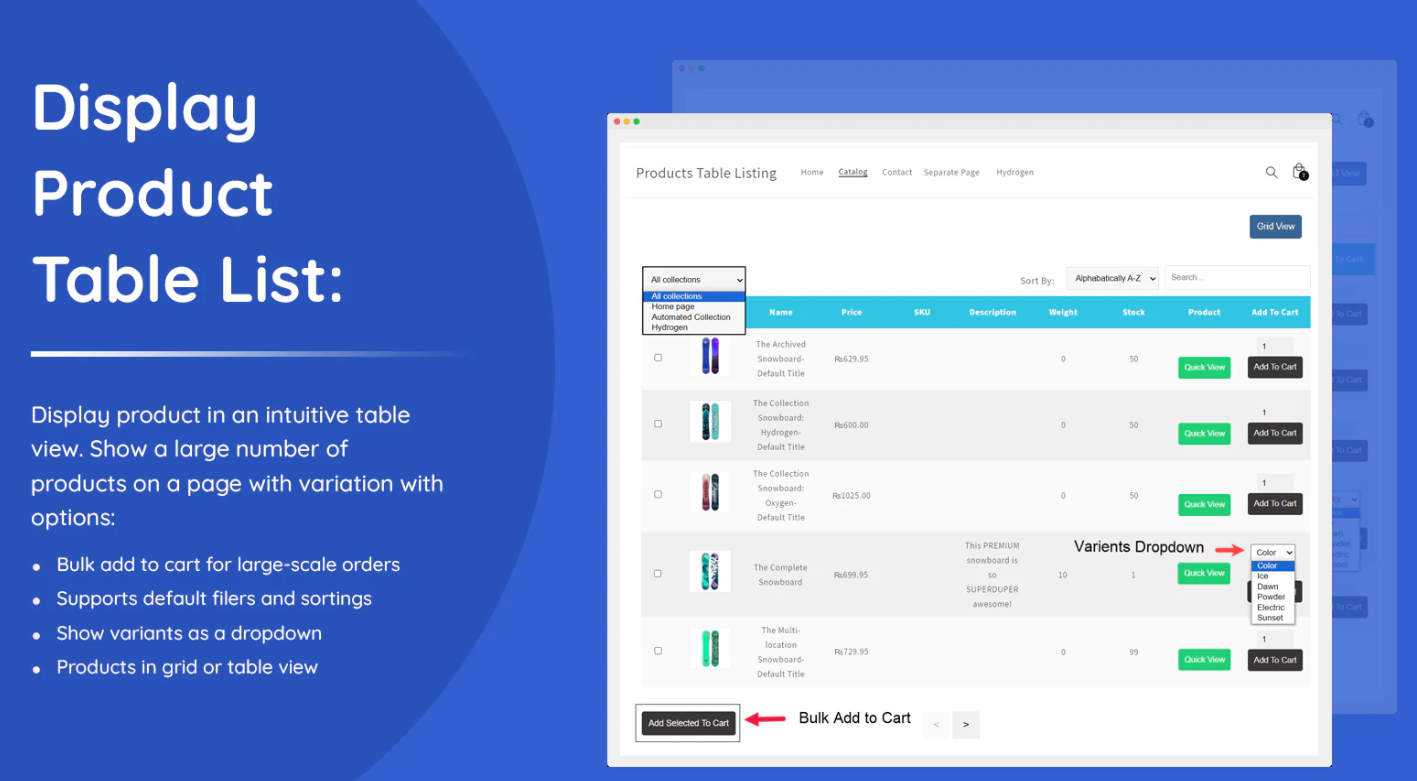
Unlike standard grid or list views, table layouts allow you to showcase products with maximum detail all in one place. Customers can see essential information—like price, SKU, stock status, and product variations—without clicking into each individual product page. For store owners, this means you can highlight important details that matter most to buyers, like bulk pricing for wholesale or B2B clients.
Table layouts are especially effective for Shopify stores that handle Shopify bulk order scenarios. By providing an easy-to-read table format with quick buy and bulk add-to-cart buttons, customers can select multiple items at once, making the purchasing process faster and more convenient. This improves the shopping experience for both individual buyers and business clients who regularly place large orders.
Customizing Your Product Tables
A key advantage of table layouts is customization. Most apps that support product tables allow you to choose from default fields and display only the information that matters most to your customers. You can create separate table views for specific collections or customer tags, such as wholesale buyers or B2B clients. This ensures your store remains relevant and personalized for each audience.
Additionally, giving customers the option to toggle between the default product view and the table layout offers flexibility. Some shoppers prefer a visual grid layout with images, while others—especially those making bulk purchases—prefer a structured table format that allows quick comparison and easy selection.
Benefits for Shopify Bulk Order Customers
For businesses handling bulk orders, table layouts are a game-changer. Customers can see all available products, select quantities, and add multiple items to their cart in just a few clicks. This eliminates the tedious process of opening each product page individually, streamlining the ordering process and reducing friction in the buying journey.
By providing a table view tailored to bulk buyers, you’re not only improving usability but also increasing the likelihood of larger orders. Faster navigation, clear product details, and easy bulk purchasing create a smoother experience that encourages customers to complete their purchases confidently.
Creating a Complete Product Catalog Page
Another powerful feature of table layouts is the ability to create a dedicated catalog page. Instead of scattering products across multiple pages, you can showcase your entire inventory in a single, organized view. This is ideal for stores that want to give B2B clients or wholesale buyers full visibility into their product range and facilitate Shopify bulk order purchases.
Conclusion
Moving from a confusing, cluttered catalog to a structured table layout can dramatically improve the shopping experience on your Shopify store. Table layouts not only simplify navigation but also enable customers to make faster, more informed purchasing decisions. Whether you’re targeting retail shoppers, wholesale clients, or B2B buyers, table views combined with quick buy and bulk add-to-cart features ensure your store is easy to navigate and ready to handle Shopify bulk order transactions efficiently.


