How to Build an AI Chatbot That Resolves Customer Questions Before They Become Support Tickets
Every support ticket begins with a customer looking for an answer. Sometimes it is a simple question about pricing, account setup, delivery, or product features. If customers cannot find the information they need quickly, they submit a support request, even when the answer already exists on your website.
This is where a chatbot can make a real difference.
Instead of waiting for customers to create support tickets, a well-designed chatbot can provide accurate answers the moment they are needed. It does not replace your support team. Instead, it prevents routine questions from becoming support tickets in the first place, allowing your team to focus on more complex issues that require human attention.
The objective is not simply to answer questions. It is to solve problems before they reach your support queue.
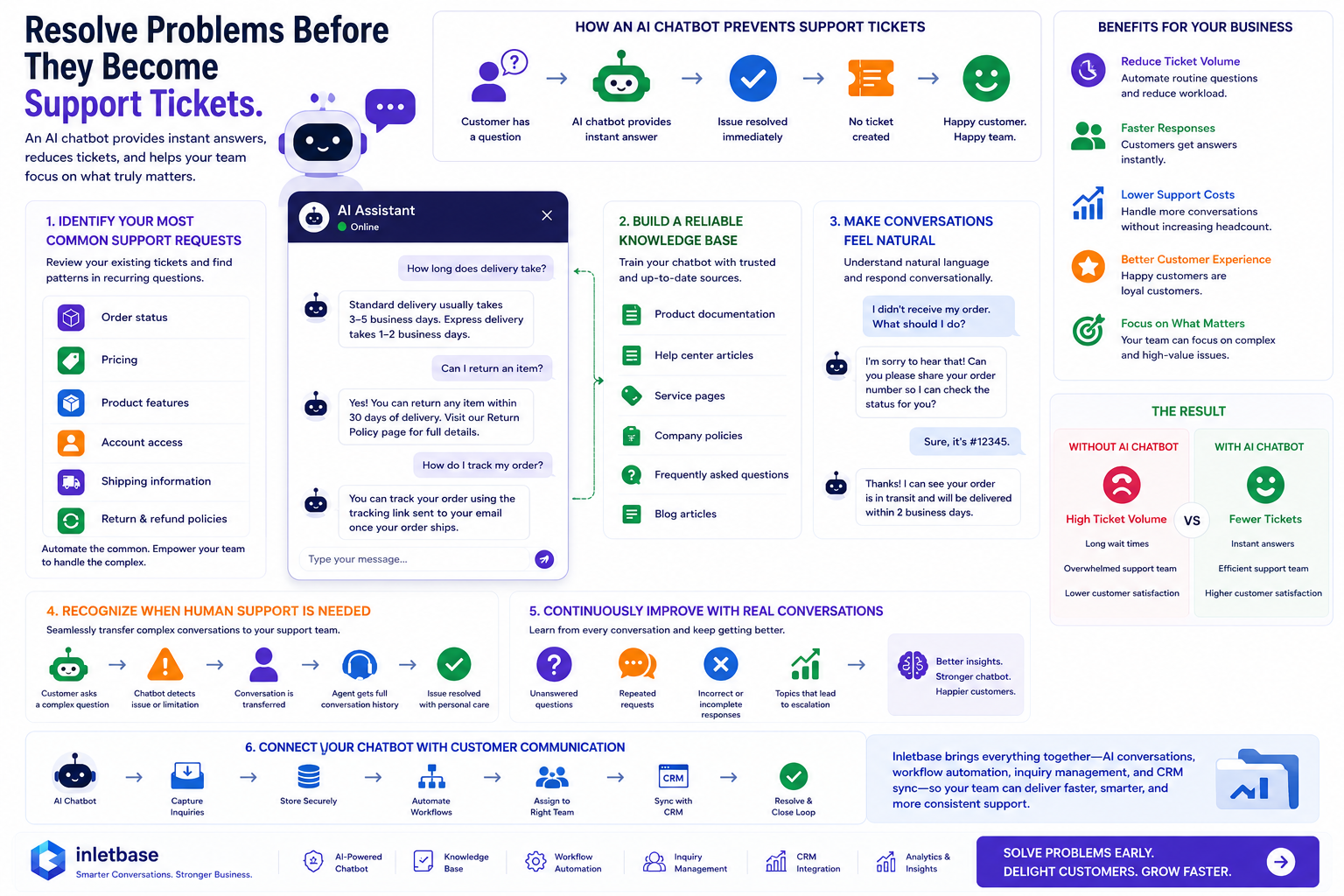
Identify Your Most Common Support Requests
Start by reviewing your existing support tickets.
You will often find that a large percentage of requests are about the same topics, such as:
- Order status
- Pricing
- Product features
- Account access
- Shipping information
- Return and refund policies
These topics are excellent candidates for chatbot automation because they usually have clear and consistent answers.
By handling these inquiries automatically, your support team gains more time to resolve complex customer issues.
Build a Reliable Knowledge Base
A chatbot is only as useful as the information it can access.
Train it using trusted resources, including:
- Product documentation
- Help center articles
- Service pages
- Company policies
- Frequently asked questions
- Blog articles that explain your products or services
When this information is accurate and regularly updated, customers receive reliable answers.
Make Conversations Feel Natural
Customers should not feel like they are interacting with a search engine.
Instead of forcing visitors to type specific keywords, design the chatbot to understand natural language and respond conversationally.
If a question is not completely clear, the chatbot should ask a simple follow-up question instead of making assumptions.
Natural conversations improve accuracy and make it easier for customers to find the information they need.
Recognize When Human Support Is Needed
Some situations require personal attention.
If the chatbot detects a billing issue, a technical problem, or a request outside its knowledge, it should transfer the conversation to a support agent without unnecessary delay.
Providing the support agent with the conversation history saves time and prevents customers from repeating themselves.
A smooth handoff helps resolve issues more efficiently.
Continuously Improve With Real Conversations
After deployment, regularly review chatbot interactions.
Pay attention to:
- Questions it could not answer
- Repeated customer requests
- Incorrect or incomplete responses
- Topics that frequently require human assistance
These insights help improve both your chatbot and your website content over time.
Create a Smarter Support Process
Routine customer questions can be handled automatically by training a chatbot with accurate company information. This allows customers to receive quick answers while enabling support teams to focus on requests that require personal assistance.
Preventing common questions from becoming support tickets helps reduce workload and improves support efficiency.
Connect Your Chatbot With Your Support Tools
A chatbot becomes more effective when it works alongside your existing support tools.
Connecting conversations with inquiry management, customer records, and support workflows helps teams keep track of requests and route unresolved issues to the appropriate team while preserving the conversation history.
A connected support process helps teams respond more efficiently and maintain continuity across customer interactions.
Final Thoughts
The most effective support ticket is the one that never needs to be created.
By identifying common customer questions, building a reliable knowledge base, enabling natural conversations, recognizing when human assistance is needed, and continuously improving through real interactions, you can create a chatbot that helps customers find answers before they need to contact your support team.
When customers receive timely and reliable information, support teams have more time to focus on the issues that require human expertise. This creates a smoother support process for both customers and support teams.


